The inspector
The inspector is the primary editor for the focused cue.
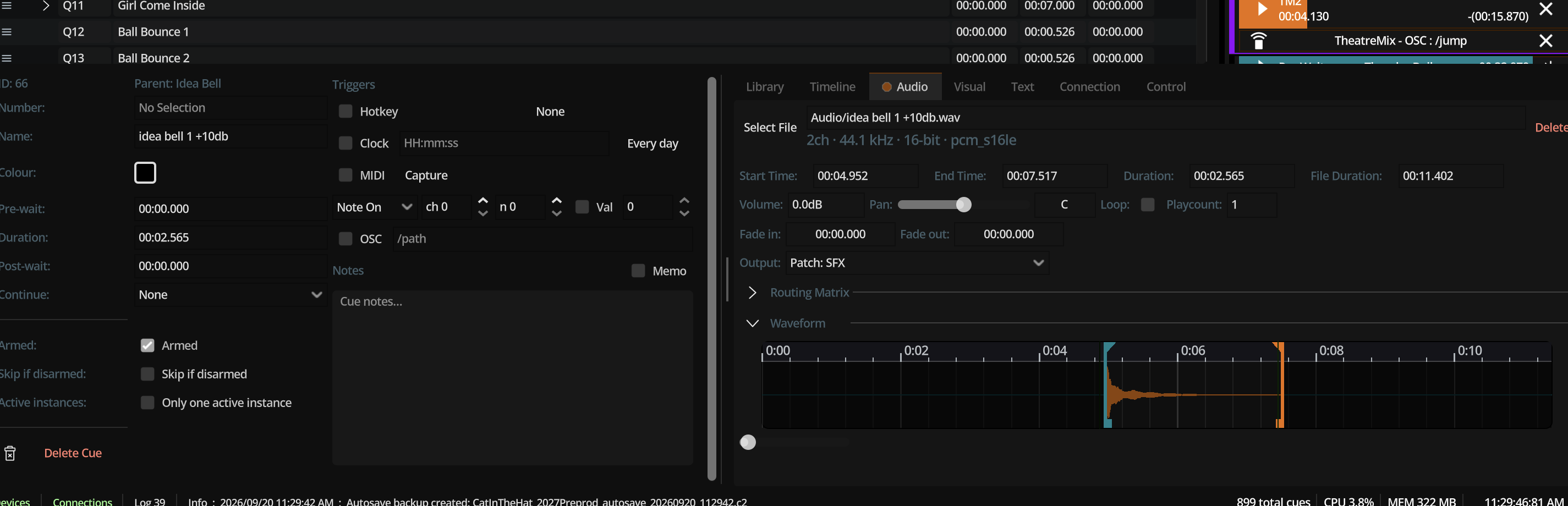
Tabs (typical)
| Tab | Contents |
|---|---|
| Shell | Number, name, colour, armed, waits, follow, notes, memo, triggers (hotkey / OSC / MIDI / clock) |
| Timeline | Visual layout of components and nested children over time; optional waveforms |
| Audio | File, waveform, in/out, loop, levels, pan, fades, patch, routing matrix |
| Video | File/image, in/out or hold duration, layout, opacity, target layer, embedded audio |
| Text | Content, typography, layer, duration, style |
| Connection | OSC send components, MIDI output |
| Control | Control components (GO/stop/fade/seek/translate) |
| Library | Save/load library entries related to the cue |
Exact tab availability depends on what components exist and UI focus rules.
Editing rules
- Record before mutate — document edits go through undo (you do not need to think about this; the UI does).
- Continuous fields (names, drags) coalesce into one undo step until focus exits or drag ends.
- Multi-edit may apply shell changes to all selected cues when enabled.
- While undo is restoring, the inspector suppresses re-entrant records.
Previews
Video and text inspectors can show preview surfaces that do not replace house outputs. Preview resolution can be reduced in video output settings without changing output quality mode.