The main window
The main window is where you program and run a show.
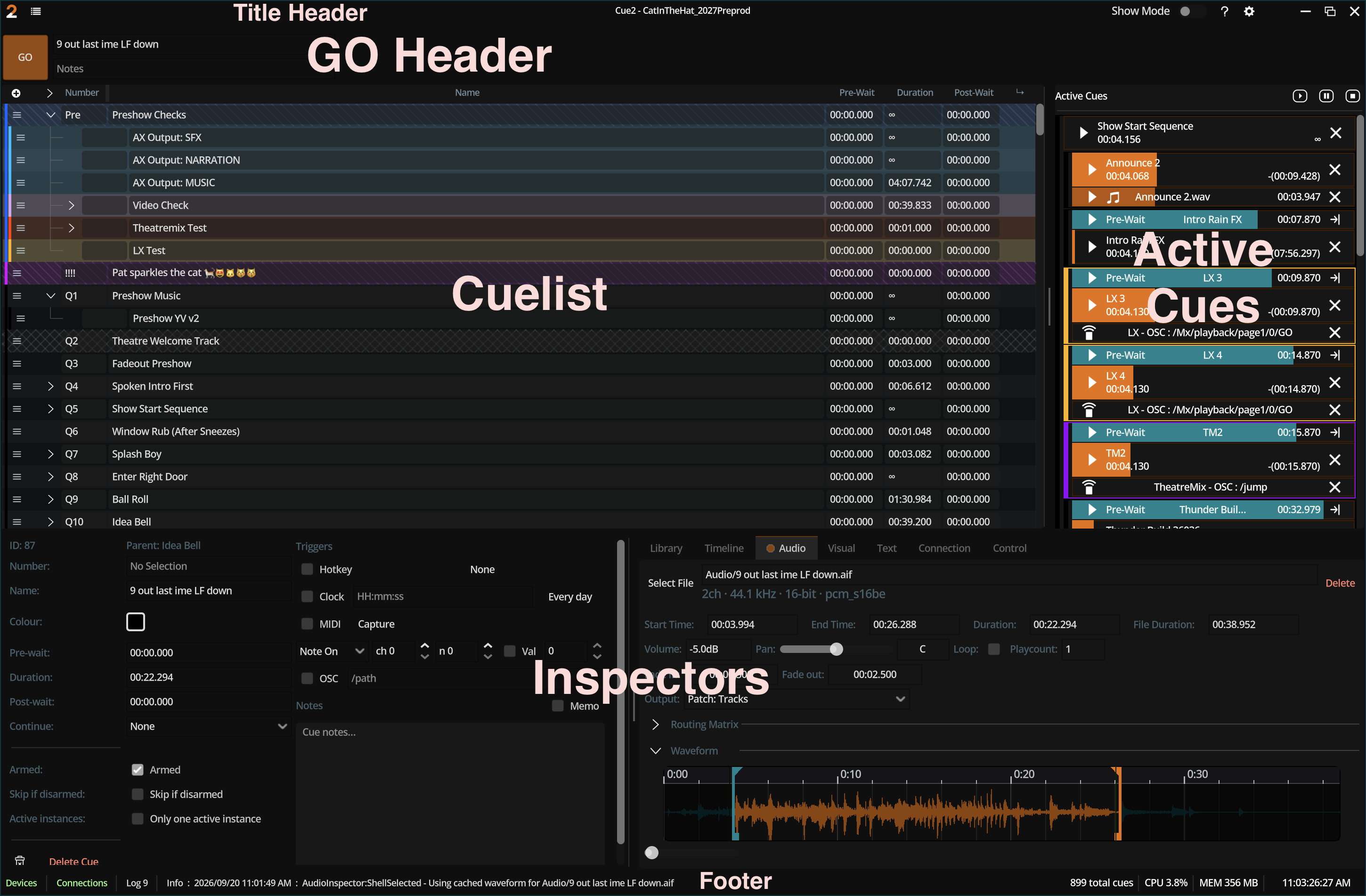
Regions
| Region | Role |
|---|---|
| Title bar menus | Session, edit, playback, view, help |
| Cuelist | Ordered shells; selection; drag reorder; nest chrome |
| Inspector | Edit shell and components for the focused cue |
| GO header | Primary GO affordance; can be scaled or hidden in settings |
| Active cues | Live instances: progress, stop, levels feedback |
| Footer | Session path hints, backup progress, messages |
Focus vs multi-selection
- Focused cue drives which inspector content you edit.
- Multi-selection supports bulk shell edits when multi-edit is enabled in General settings.
Related windows
| Window | How to open | Purpose |
|---|---|---|
| Settings | View → Settings or Ctrl+, | Show settings + preferences tree |
| Log | View → Log | Event log |
| About | Help → About Cue2 | Version and licenses |
| Video outputs | Created by canvas/screens | House displays (not the editor) |
Related
- Inspector
- Cuelist
- General settings (UI scale, GO scale, cuelist scale)